AI-Driven Refactoring in Large Scale Migrations: Strategies and Techniques.

A mountain of legacy code
Seven years ago, when Qonto was a new fintech with a handful of engineers and a single mission-critical web app, we chose Ember.js as our framework. In April 2016, the very first commit of what would become app.qonto.com landed in the repo, and Ember carried us through our explosive growth: from “just launched” to hundreds of thousands of customers, 30 deployments a day, and a rock-solid 93% test coverage.
Ember carried us through years of rapid product development and countless feature launches, but the innovation in software engineering never stops. Our product ambitions expanded, and so did the frameworks and technical stacks around us. To stay at the forefront of front-end development, in late 2023, we set a new heading, as detailed in our article “Setting sail from Ember: why we are charting a course toward React at Qonto”: “Let’s chart a course toward React.”
The decision felt energising, but it came with a price: migrating ~1 million lines of code from Ember to React.
We estimated a software engineer to migrate roughly 50 lines of code a day without sacrificing quality. At that pace, with enough engineers dedicated to this task, rewriting the whole app would stretch beyond two years of full-time effort (while we kept shipping new features on top of the old stack). And let’s be honest, migrating and refactoring code from one framework to the other is not exactly anyone’s idea of fun.
We needed a better route. One where AI and codemods automate most of the job, and engineers focus on the tricky edges.
“In the age of AI, how can we speed up migrating a mountain of legacy code?”
This post is about that journey: how we are approaching this project, what worked, what didn’t, and how AI transformed what seemed like an overwhelming migration into a clear and attainable task.
“How can we leverage AI to do this for us?”
In late January of this year, 2025, we launched an internal kaizen (a focused, continuous improvement initiative). By that time, Claude 3.5 Sonnet by Anthropic had already demonstrated significant maturity as a model, especially given its strong performance on SWE-Bench, a benchmark evaluating foundation models’ capabilities in realistic coding tasks. Recognizing its potential, we asked ourselves: how could we leverage this advanced LLM to automate substantial portions of our migration?
We set ambitious goals for ourselves: if an individual engineer managed to migrate ~50 LoC (lines of code) per day manually, maybe AI assistance could double that to 100 LoC/day; in this kaizen initiative, we aimed at doubling it again to 200 LoC/day.
This digit felt bold at the time.
Little did we know we would blow past this target by orders of magnitude!
First experiment: a quick win with RAG
Every journey starts small. Our first experiment was to build a quick prototype, a web-based AI assistant that could help us convert Ember code to React on a case-by-case basis. We started with a Retrieval-Augmented Generation (RAG) approach using an AI agent fed with our internal data sources, including our monorepo on GitHub and our knowledge base.
The result of this first iteration was a web-based chatbot that we could feed Ember code to and ask for the equivalent React code. We augmented it with a refined system prompt, coding guidelines, and snippet examples for context.
To our delight, this chatbot showed promising results! With proper prompting and some back and forth, it could output acceptable React components from Ember inputs. This was a big morale boost, the concept was sound.
However, this was just the beginning.
The bot worked well in a sandbox, but it wasn’t yet integrated into our development workflow. It still required engineers to context switch between the web interface of the chatbot and their editor, and manually prompt each time they wanted to convert code from Ember to React.
We wanted to go further: to have AI directly working on our actual codebase, ideally making changes that were automatically committed with little supervision.
The question now became: how do we turn this into a more automated, practical engineering tool?
Hackathon to production: building an AI-powered CLI
A few weeks in, at the beginning of February 2025, armed with confidence from the prototype, we organised a one-day internal hackathon to level up the idea.
Our small team (engineers from various squads who were passionate and curious about AI) got together with a mission: to enable an LLM to do the migration for us.
In a single day, we brainstormed, coded, and demoed an MVP CLI tool that automatically refactored Ember components to React. It was a lot of trial and error, analysing already-migrated code to spot patterns, crafting prompts based on Ember-React diffs and our internal guidelines, and evaluating different tools and LLMs.
By the end of the hack day, we had a rough but working CLI agent. This script could take an Ember component file and generate a React version, end-to-end.
At the core of the script, we picked aider an open-source command-line tool designed to automatically apply code changes generated by LLMs based on a prompt. It offers built-in support for multiple models and easy to plug it in using AWS Bedrock as a provider. We chose it because being a CLI we could quickly script it, customise prompts, iterate, and experiment across different models and inputs, all within our existing development workflow.
Here’s an overview of how it works:

General overview of our CLI agent using aider and Anthropic’s Claude via AWS Bedrock
In simple terms, the CLI automates the whole refactoring process:
Select code & branch creation: We choose a target component (via a fuzzy finder) and the tool spins up a new git branch for that migration. This keeps changes isolated and reviewable.
AI Pass 1, Ember to React:
aidercalls our LLM (claude-3–5-sonnet, Anthropic’s latest model at that time, viaAWS Bedrock) with a carefully crafted prompt. The prompt includes the Ember component code as input and asks for the equivalent React code, while following our coding guidelines and style conventions.aiderstreams the AI’s suggested changes and applies them to the code-base as an initial diff.codemodadjustments: Next, we run a customcodemod(react-bridge-migrator) on the output. Thiscodemodhandles mechanical tasks and fine-grained fixes. Think of things like adjusting imports, hooking the component into our React app framework, and other repetitive changes that are easier to script deterministically.AI Pass 2, review and polish: With the
codemodadjustments in place, we then invokeaider+claudeagain to review the combined diff (original Ember vs. new React) and refine the result. In this second pass, the engineer can pair program interactively in natural language with the LLM to fix any inconsistencies, apply final touches, or handle pieces thecodemoddidn’t cover.Automatic commit: If all goes well, the CLI then automatically creates a
git commitwith the changes (Ember component replaced by the new React component). The developer’s role shifts from writing boilerplate to reviewing the automatically migrated output, a much more efficient use of time!
Throughout this process, the LLM is doing the heavy lifting of code generation.
We experimented with different models and at that time found that claude hit a sweet spot of quality and context length for our needs, and aider made it easy to feed multiple files into the prompt (e.g., "already migrated" examples and style guides) and to iteratively refine the output.
In effect, we built an AI pair programmer, embedded in our CLI, that knew our guidelines, our code-base, and could directly migrate Ember code to React with little supervision.
Results: high-velocity
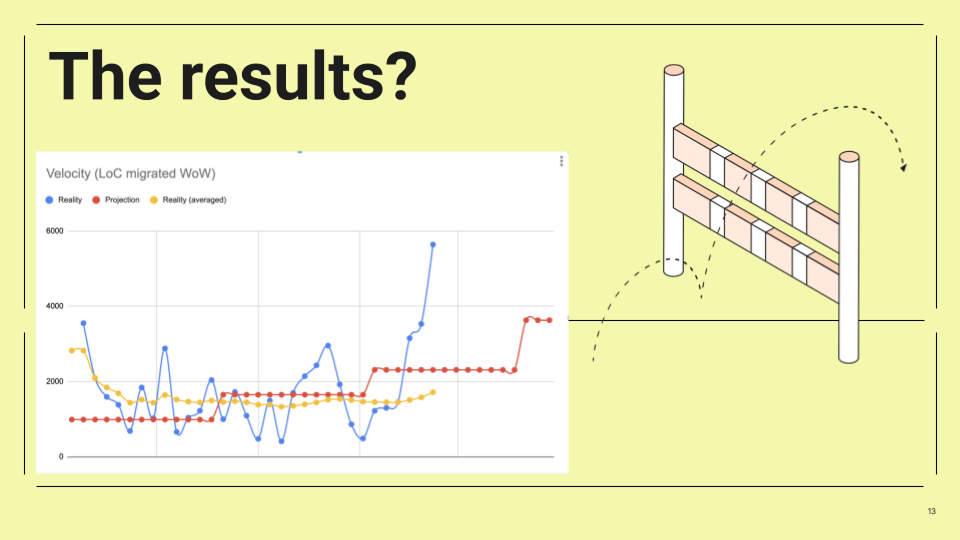
Velocity of migration (lines of code converted per week). After introducing the AI-driven CLI. Our actual migration velocity (blue line) surged far above the original projected pace (red line).
With the initial version of the agent complete, we began a two-week evaluation period starting February 10th, 2025. During this time, we closely monitored the lines of code migrated with the agent: the results exceeded all expectations. Our migration throughput skyrocketed. We went from ~50 LoC/day per engineer to hundreds of lines per day, sometimes even breaking the 1,000 LoC/day per engineer. The weekly velocity chart above tells the story: once the AI agent came online, the blue line (actual migrated code per week) shoots up like a rocket, leaving the modest linear projection (red line) in the dust.
In concrete terms, at peak performance, the tool delivered about 20 times the output of manual coding.
That’s roughly a 2,000% gain in productivity over our original estimation!
Even we had trouble believing these numbers at first! What used to take days now takes hours or minutes. In the span of two weeks, one dedicated engineer, with marginal assistance from a teammate, successfully migrated 8,632 lines of code using the agent.
Equally important: quality and consistency remained high. Since the AI was adopting our own code patterns (as we fed it examples of already-migrated components and guidelines), the React code it produced was in line with our expectations: while not every AI suggestion was perfect the first time, a human-in-the-loop review filled the gap.
Notably, this performance level was already attained using claude-3–5-sonnet, and as new models were released, we observed a significant improvement when upgrading to claude-3–7-sonnet when released on February 24th, 2025, and most recently to the latest claude-4-sonnet released on May 22nd of 2025.
Kaizen in action: small team, big impact
It’s worth highlighting how crucial the kaizen approach was to this effort. We treated this project as a series of small, iterative improvements rather than a big top-down initiative. A tiny task force (just a small team of motivated engineers) took the idea and ran with it in a hackathon-style blitz. This gave us speed and creative freedom. We weren’t afraid to try something experimental.
After the initial hackathon success, we continued in iterative cycles: brainstorm, prototype, test, repeat. Each iteration taught us something that fed into the next. This lean approach is classic kaizen: making continuous small improvements that compound into significant gains. In our case, this mindset helped us to quickly navigate uncertainties in prompt engineering and tool integration. Instead of getting stuck in analysis paralysis, we built a proof of concept, evaluated impact, and then doubled down on what worked; as a result, we moved fast.
What can you learn from our experiment?
Using AI to refactor such a large codebase in production taught us valuable lessons:
The importance of an extensive test suite: At Qonto, we are proud of a comprehensive test suite that, between integration, unit, and acceptance tests, covers 93% of our code. In a very large refactoring, having a solid testing foundation allows you to move fast and with much more confidence, knowing that regressions would be caught by the tests.
Prompt engineering is the key: the quality of the AI’s output is highly dependent on the prompt. Being explicit in the instructions results in much higher quality output. For example, our prompt was not a simple “convert this Ember component to React” but contained a detailed structure containing our coding guidelines (function component style, hooks usage, etc.) and hand-picked examples of Ember-to-React transformations, with dos and don’ts and best practices.
Human-in-the-loop: As much as the AI helps us move faster, it does not replace the need for experienced human judgment. Having a software engineer in the loop to validate and run the application ensures quality. The AI got us 90% of the way there, and we, engineers, handled the rest.
AI evolves fast: During our experimentation period of only a few months, we witnessed significant developments, including major LLM releases such as
claude-3–7-sonnetandclaude-4-sonnet, along with the introduction of new powerful tools likeClaude Code. Now more than ever it’s fundamental to maintain short feedback loops, continuously update our knowledge, and remain open to emerging technologies.Tooling:
aiderwas instrumental as an open-source CLI because it allowed flexibility during our initiative.
Challenges and next steps
“So, what’s next for the AI migration agent?”
Short answer: we’re evolving it.
While the CLI agent delivered massive wins during our kaizen, this is not the final form. We quickly learned that, as powerful as it was, a CLI agent in the shape of a CLI script didn’t quite fit the daily habits of most front-end engineers. We had to ask ourselves: what’s the most natural environment for developers to use this kind of tooling?
That led us to a new direction, a VS Code extension that is integrated within developers’ IDE.
What didn’t work
The CLI agent was a
bashscript, and while that kept things simple for a quick prototype, it started to show limits. There was little room for scalability, debugging prompts were clunky, and it wasn’t tightly integrated with the editor.Front-end engineers preferred staying inside their IDE, not context-switching between a terminal and their editor. An integrated extension makes the experience more fluid and ergonomic.
The prompt architecture needed rethinking. Initially, we put everything (guidelines, examples, diffs) into one huge markdown prompt. This made it hard to maintain and even harder to debug.
We’ve since learned that splitting the prompt into modular files makes it easier to reason about and easier for teammates to refine and contribute. It also helps the LLM process the input better: the separation creates a clearer semantic structure and reduces noise.
So the next step in this journey? We’re keeping up to date with the latest trends of agentic engineering, and we’re actively developing new tools to help our engineers. For example, we’re developing a dev extension that brings the power of our AI agent closer to where engineers work. We’re keeping the heart of what made the CLI great, automation, prompts, and AI pair programming, but wrapping it in a smoother, more accessible interface.
Conclusion: adopting AI with a continuous improvement mindset
What started as an experiment ended up fundamentally accelerating a critical migration for us. We leveraged AI and, with a true kaizen mindset, we turned a huge project into an opportunity to innovate and learn.
AI is extremely powerful, and the question is, how best can you leverage it? In our case, we applied it to augment our engineers, automating extremely time-intensive tasks at a scale and speed that still impresses us.
This journey also reminded us of the value of exploring new approaches and pushing the boundaries of our engineering workflows.
It’s easy to stick to tried-and-true methods, but a small, passionate team with a bold idea can deliver outsized results with new and innovative approaches!
Comments
Join the discussionNo comments yet. Be the first to comment.


